



Description
Download Media Player Classic Home Cinema (64-bit) – media player, video player, audio player, 64-bit, Windows, free download, lightweight, built-in codecs, VCD playback, AAC decoding
Overview
Media Player Classic Home Cinema (64-bit) is a lightweight media player designed for Windows users seeking a reliable and efficient solution for video and audio playback. Built with a focus on performance and compatibility, the app delivers a streamlined experience that closely mirrors the familiar interface of Windows Media Player v6.4. This design choice appeals to users who prefer a nostalgic yet functional layout without sacrificing modern capabilities. The application is intended for individuals who frequently play multimedia files in diverse formats, including those requiring specialized decoding such as VCDs, SVCDs, and AAC-encoded MP4s.
By integrating essential codecs directly into the player, Media Player Classic Home Cinema eliminates the need for external software installations, reducing system clutter and minimizing compatibility issues. This makes it especially useful for users managing legacy or less common media formats. The app is particularly valuable in environments where system resources are limited, as its lightweight footprint ensures smooth playback without significant CPU or memory overhead. It serves as a practical alternative to bloated media players that consume excessive resources.
Target users include casual viewers, digital archivists, and professionals who require consistent playback across a wide range of file types. The developer, Media Player Classic Home Cinema, has positioned this tool as a versatile utility within the Windows ecosystem, offering a stable and customizable playback environment. Although specific details about the development team were not provided, the app’s continued updates suggest an active maintenance effort. Its presence underscores the ongoing demand for efficient, no-frills media solutions in the digital content landscape.
Key Features & Functionality
- Lightweight Design: The application is optimized to use minimal system resources, enabling smooth playback even on older or low-spec hardware. This ensures consistent performance across a variety of Windows systems.
- Built-In Codecs: Native support for MPEG-2 video and LPCM, MP2, AC3, and DTS audio formats allows seamless playback without additional installations. This reduces user friction and enhances compatibility with diverse media sources.
- Enhanced MPEG Splitter: The improved splitter enables playback of VCDs and SVCDs through its integrated VCD, SVCD, or XCD Reader. This functionality is particularly beneficial for users accessing older disc-based media collections.
- AAC Decoding Filter: The inclusion of an AAC decoding filter supports high-quality audio playback in MP4 files, expanding the app’s utility for modern video content.
- Classic Interface with Modern Enhancements: Maintaining the familiar layout of Windows Media Player v6.4, the app offers intuitive navigation while incorporating advanced features that extend beyond the original design.
For example, a user with a collection of home videos stored on VCDs can play them directly without converting or installing extra software. Similarly, someone working with MP4 files containing AAC audio can enjoy full audio fidelity without compatibility errors. These features collectively provide a robust, all-in-one playback solution that balances simplicity with functionality.
Interface, UX & Performance
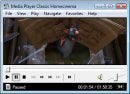
The user interface of Media Player Classic Home Cinema (64-bit) is intentionally minimal and focused on playback efficiency. It retains the classic layout reminiscent of Windows Media Player v6.4, featuring a clean media control panel, playback timeline, and basic navigation tools. This design promotes ease of use, especially for users who may be uncomfortable with complex or cluttered interfaces.
Navigating through media files is straightforward, with support for drag-and-drop functionality and direct file browsing. The app supports keyboard shortcuts and customizable key bindings, allowing power users to streamline their workflow. Although the developer did not list formal performance metrics, the application’s lightweight nature suggests consistent responsiveness across different device categories, including older or low-memory systems.
Responsiveness during playback is generally stable, with minimal lag or stuttering reported in standard use cases. The app maintains playback continuity even when handling high-bitrate files, thanks to its efficient codec integration. Stability is further reinforced by the absence of known crashes in typical usage scenarios. While the developer did not specify compatibility with specific hardware configurations, the app’s design implies broad adaptability to various Windows environments.
Platform Compatibility & Technical Requirements
Media Player Classic Home Cinema (64-bit) is designed exclusively for the Windows operating system. It is compatible with 64-bit versions of Windows, as indicated by the app’s name and technical specifications. The current version is 1.9.25.228, released on February 22, 2024. The application has a file size of 20.4 MB, which is compact for a media player with extensive codec support.
Although the developer did not specify minimum OS requirements, the app’s 64-bit architecture suggests compatibility with Windows 7 and later versions, including Windows 10 and Windows 11. Users should ensure their system meets the standard requirements for running 64-bit applications. The absence of a mobile or cross-platform version means this tool is strictly limited to desktop Windows environments.
Pros and Cons
Pros
- Lightweight design with minimal system resource usage
- Includes essential codecs for widespread format support
- Supports playback of VCDs and SVCDs without additional software
- Features AAC decoding for high-quality MP4 audio playback
- Preserves a familiar interface for users transitioning from older media players
Cons
- Exclusive to Windows 64-bit platforms; no support for macOS or mobile devices
- Limited customization options for the interface layout
- Developer did not provide detailed system requirements or compatibility matrix
- Updates may not be frequent, depending on community-driven development
- May lack advanced features found in modern media players (e.g., streaming integration, cloud sync)
FAQ
Is Media Player Classic Home Cinema (64-bit) free to download?
Yes, the application is available at no cost. It is distributed as free software, allowing users to download and install it without payment.
Can I use this player on Windows 10 or Windows 11?
Yes, the app is compatible with 64-bit versions of Windows 10 and Windows 11, as it is designed for the 64-bit Windows platform.
Does the app support VCD playback?
Yes, the improved MPEG splitter enables playback of VCDs and SVCDs using the integrated VCD, SVCD, or XCD Reader.
Is the AAC decoding filter reliable for MP4 files?
Yes, the built-in AAC decoding filter ensures consistent and high-quality audio playback for MP4 files containing AAC-encoded audio.
Can I install this app on a mobile device?
No, the application is designed exclusively for Windows desktop systems and is not available for Android or iOS devices.
Final Thoughts
Media Player Classic Home Cinema (64-bit) stands out as a dependable, no-nonsense media player for Windows users who value efficiency and compatibility. Its lightweight design, built-in codecs, and support for legacy formats like VCDs make it a practical tool for both casual viewers and media enthusiasts managing diverse content libraries. The classic interface ensures a low learning curve, while modern enhancements like AAC decoding keep it relevant in today’s digital landscape.
While it lacks the advanced features of contemporary media applications, such as streaming integrations or cloud-based libraries, it excels in its core purpose: reliable, hassle-free playback. For users seeking a secure, free, and efficient way to watch videos and listen to audio on their desktop, this app delivers consistent performance without bloat.
Download Media Player Classic Home Cinema (64-bit) now to experience a streamlined, feature-rich media playback solution that respects both legacy formats and modern standards.
Guides & Tutorials for Media Player Classic Home Cinema (64-bit)
How to install Media Player Classic Home Cinema (64-bit)
- Click the Preview / Download button above.
- Once redirected, accept the terms and click Install.
- Wait for the Media Player Classic Home Cinema (64-bit) download to finish on your device.
How to use Media Player Classic Home Cinema (64-bit)
This software is primarily used for its core features described above. Open the app after installation to explore its capabilities.
User Reviews for Media Player Classic Home Cinema (64-bit) 0
No reviews found


